In beta
Home
The day on one screen: what is waiting for you, what slipped and what moved in your teams while you had your head down.
Pull requests, cards, meetings and AI terminals in one place. Agents that review, fix and summarize run on your computer, with your own AI account — and your phone keeps you deciding from anywhere.
macOS · Linux · iOS · Android

Tour
No illustrations: these are captures of the app, with demo data.
Development · Code review
The agent reviews the diff against the team's rules, separates what blocks from what is a suggestion and shows the verdict before publishing. Whether it goes to GitHub is your call.

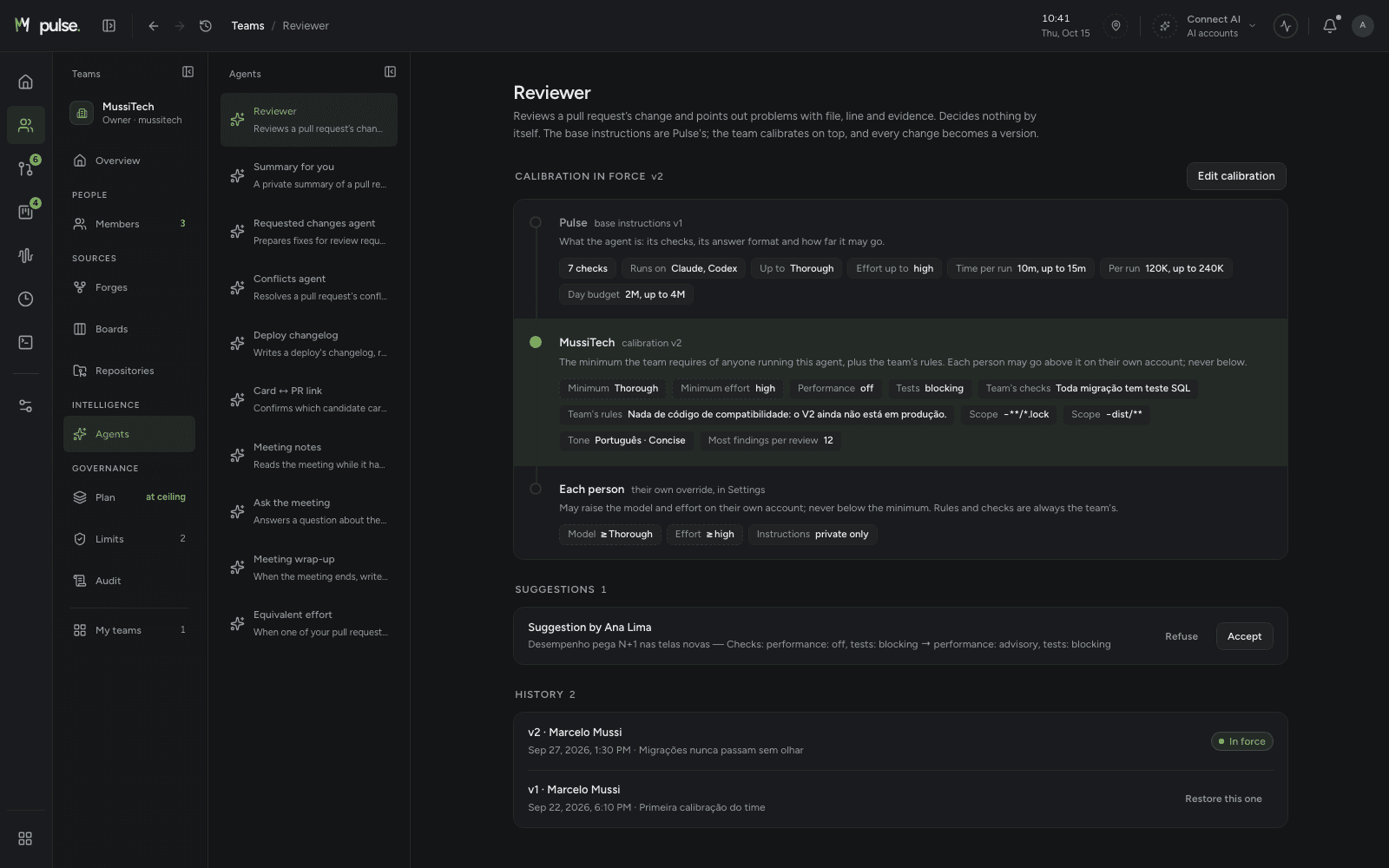
Teams · Agents
The base instructions are Pulse's; the team sets the minimum on top — rigor, checks, rules, what stays out — and each person can only go up from there, never below.
Development · Now
A live screen with the team's work in three columns: what only you can unblock, what the agents are doing right now and the queue with the reason for each item.

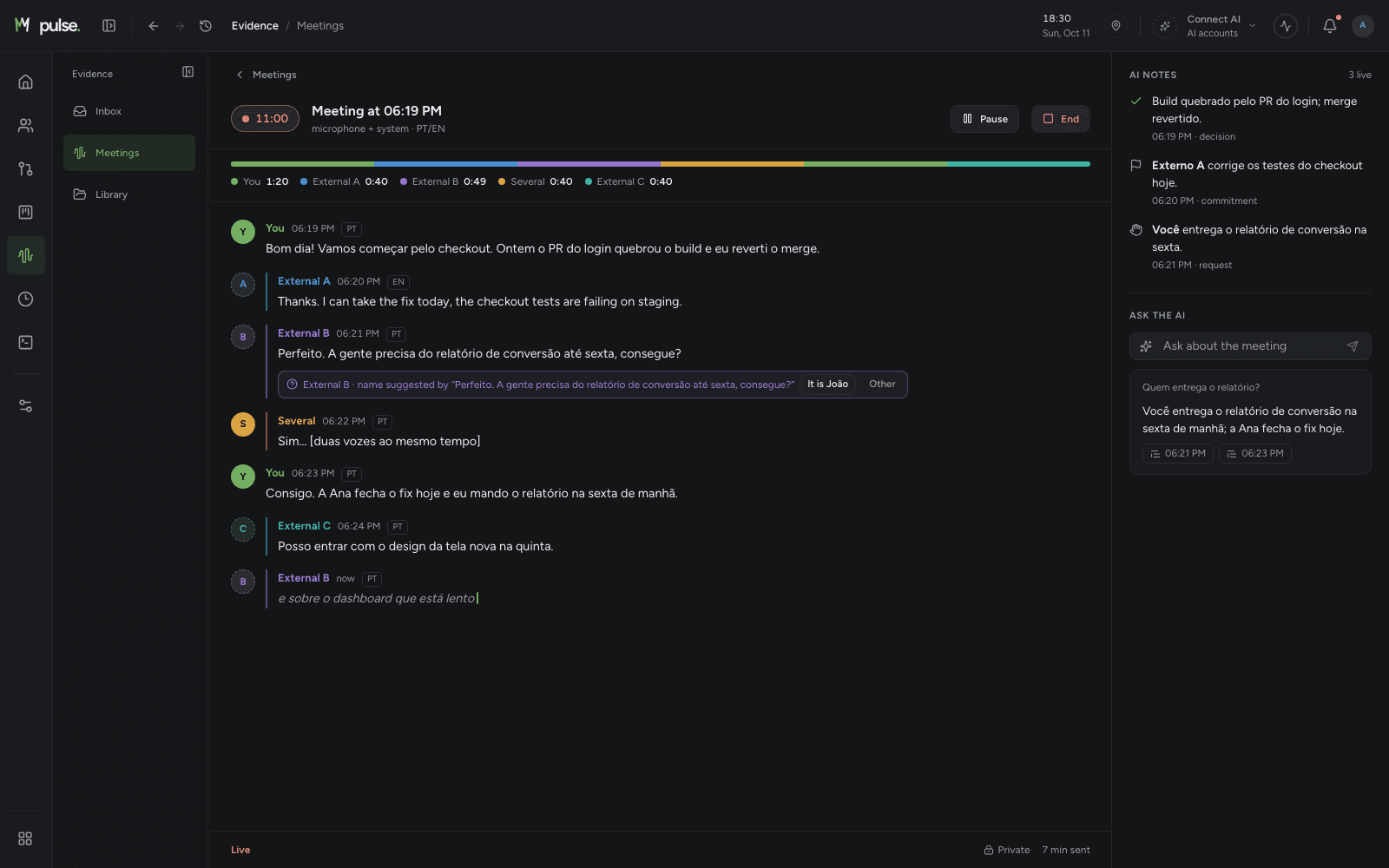
Evidence · Meetings
Record the call on your computer and follow the transcript as it happens, in Portuguese and English. The AI notes decisions, commitments and requests — and answers questions about the meeting.
Modules
Every module reads the same way — scope, list, reading pane — so nothing has to be learned twice.
Available in the beta
The day on one screen: what is waiting for you, what slipped and what moved in your teams while you had your head down.
Create the team, invite people, set roles and connect GitHub and Trello once for everyone. An audit trail says who did what.
The team's pull requests with what blocks each one, the agent's review with a verdict, assisted fixes and merge once everything is green.
The team's cards by status, what is yours, the conversations, deliveries by deploy and what has been stuck for too long.
Meetings recorded and transcribed live with AI notes, plus a local library of screen captures that never goes to the cloud.
Claude and Codex terminals opened from the card or the PR. The tab knows which work it is on, and the card moves along.
One search across PRs, cards and comments from all your teams, by word and by meaning. Each result says why it came; ask in plain words and the AI turns it into filters.
Code review, fixes, PR summary, Ask and Answer — on your AI account, calibrated by the team, with usage and cost in sight.
Coming next
Your hours built from what you did — AI sessions, PRs and meetings — by client and project, so the day closes in seconds.
AI
Agents run on your computer with the AI account you already pay for — Claude or Codex, by subscription or API key. Pulse never receives your key.
Connect your subscription or your key. Calls go from your computer straight to Anthropic or OpenAI; nothing passes through our servers.
The reviewer reads the PR's diff with the team's rules; the summary explains what changed; Ask turns a question into filters; Answer cites its sources.
Every call shows tokens, model and equivalent cost — and whether it was a subscription (an estimate) or a key (real spend). Nothing runs hidden.
Automation only exists if the team turns it on, with limits and per repository. A PR's content goes in as data, never as an instruction to the agent.
From your AI usage, only numbers reach Pulse — tokens, duration, model, agent — for internal analysis. Never what you asked, the code or the answer.
Pulse AI
Beyond the agents that run on your account, Pulse has its own AI: it follows what happens in the team and writes you what matters, without you having to ask.
It runs in the Pulse cloud, with a set spending ceiling. It reads only what the team already shares in Pulse and never uses your AI account.
What moved in the last hour, in a few lines, instead of ten loose notifications.
Deliveries, what got stuck and what is coming — ready to read on Monday morning.
Each notice says what happened and what to do, written the way a person would.
Ask about the team's work and get the answer with its sources.
Apps
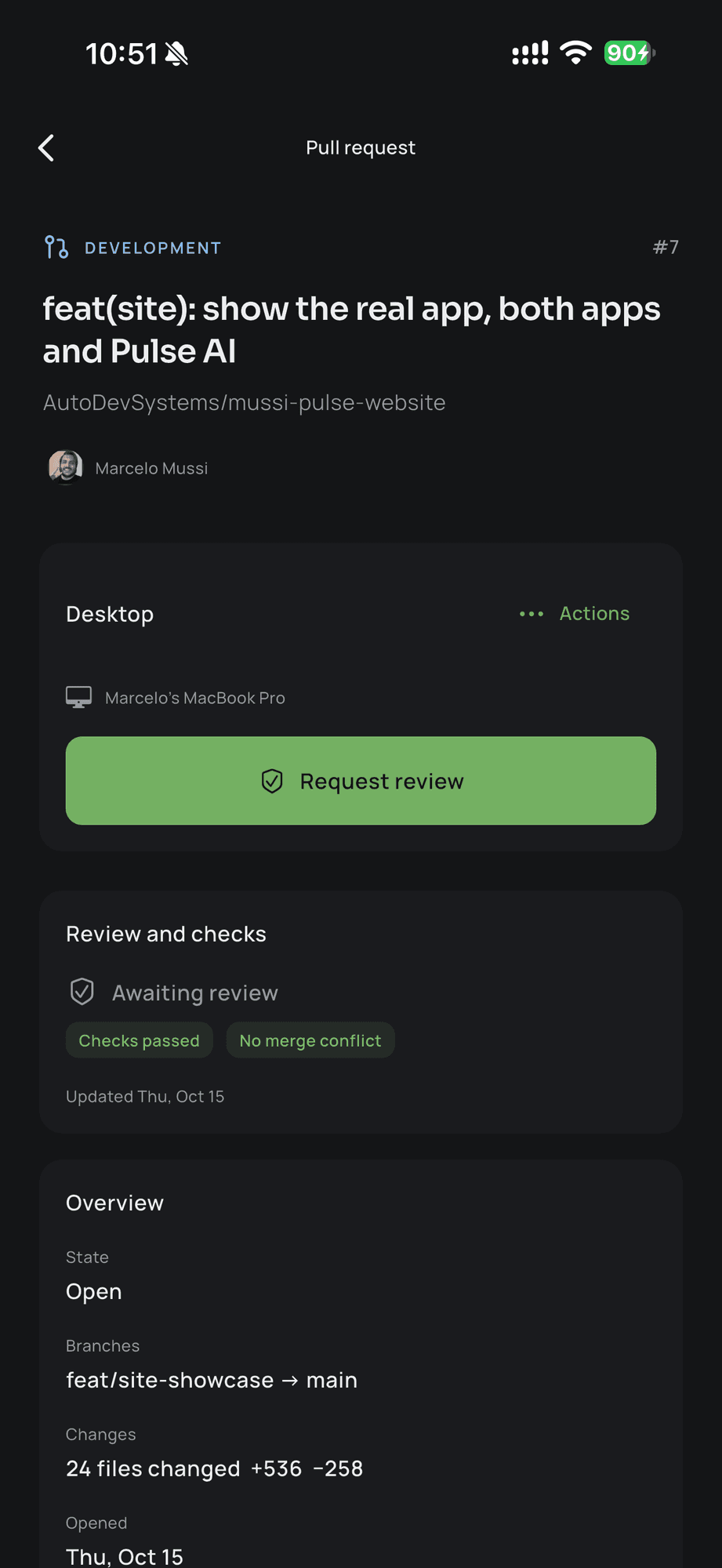
The desktop is where the work runs. The phone is where you follow along and decide when you are away from it.
The full app: every module, the agents running on your AI account and what is yours encrypted on the machine.
For iPhone and Android, paired with your desktop by a single-use code. Reads the team's base even with the computer off.
Teams
Everyone works on their own machine, with their own AI. What the team shares lives in one base: the same work, the same rules, the same history.
Give it a name, invite people by e-mail and set who is owner, admin, member or read-only.
Install the Pulse GitHub App on the repositories and link the Trello boards. Everyone on the team sees the same work, right away.
The team sets the minimum — level, rules, what may run alone —, and each person tunes it up with their own account.
During the beta, Pulse is free. Team plans will come later, with notice before any charge.
Connections
Every connection starts with a click of yours, on the provider's own screen that shows the permissions before you accept — and can be disconnected at any time.
The Pulse GitHub App reads the pull requests, reviews and CI of the repositories the team picks. It posts only when someone says so or the team turns on an automation.
GitHub App · per team
To approve, request changes or comment as yourself, on your own account — never by automation.
Sign-in with your account
The team's boards mirrored with cards, comments and lists — and your personal Trello to act as yourself.
Team · personal
Through your subscription (Pro, Max) or an Anthropic API key. The login and the key stay in your computer's keychain.
Subscription · API key
Through your ChatGPT subscription or an OpenAI API key, the same way: the credential never leaves your computer.
Subscription · API key
More than one client, more than one team — kept apart on purpose in the database itself, so nothing from one leaks into another.
Per team · per person
About your AI usage: Pulse does not use your key or your subscription. From your usage it gets only numbers — tokens, duration, model, agent — for internal analysis, and your team does not see your individual usage — see exactly what goes and what never goes.
Architecture
The agents and your keys stay on your computer. What the team shares — teams, mirrored work, search, audit — lives in the Pulse cloud, in the EU.
The app keeps what is only yours in an encrypted database and runs the agents there, on your AI account, in a process apart from the interface.
API keys, subscription logins and the local database's keys live in the system keychain, behind a PIN. They are never sent.
Teams, mirrored PRs and cards, the search and the audit trail live in the Pulse cloud, in Frankfurt, separated by team and person in the database itself.
Each person processes on their own machine; the team shares the base. It is not end-to-end encrypted — the policy says exactly who reads what.
A verified daily backup, a recovery drill every month and encrypted copies in another region.
Privacy
You carry other people's code, contracts and conversations. So Pulse says exactly what stays on your computer, what goes to the team's cloud and who can read it.
We do not use your key or your subscription. They stay in your computer's keychain, and the agents run there, on your account.
From your AI usage, Pulse gets tokens, duration and model — never the prompt, the code or the answer. Your team does not see your individual usage.
Nothing your team connects is mined to build a profile, and nobody buys access to it. It is internal use, full stop.
Disconnect any integration, delete your account in the app itself and what is yours goes with it.
Encrypted · on your computer
What is only yours stays encrypted on your computer. What belongs to the team lives in the team's cloud, separated by team and person.
your key stays with youPulse is being built by a developer who needed it first: too many teams, too many repositories, too many boards and nothing holding it all together. Invitations go out in waves.
No public download yet · the beta is free

